Personal conversation. Local. Private.
PersonS runs the model directly on your device to provide a private, local conversational experience without relying on external services to operate.
- no internet connection
- local processing
- continuous conversation

What is PersonS
PersonS is a personal conversation application designed for everyday interaction. It focuses on natural, continuous and private conversation. It is not a business tool, a productivity system or a professional service.
All activity takes place on the user’s device. Conversations and processing remain local, without relying on cloud services for the application’s normal operation.
PersonS within ORAYA
PersonS is one of ORAYA SYNTHETICS’ first public products and an active application of our research in human–synthetic interaction.
Its domain is digital conversation. ORAYA’s current research extends that work into expression, movement and physical presence through synthetic embodiment technologies.
How it works
1. input
text or voice, naturally.
2. local processing
the model runs entirely on your device.
3. response
text and voice, with speech control.
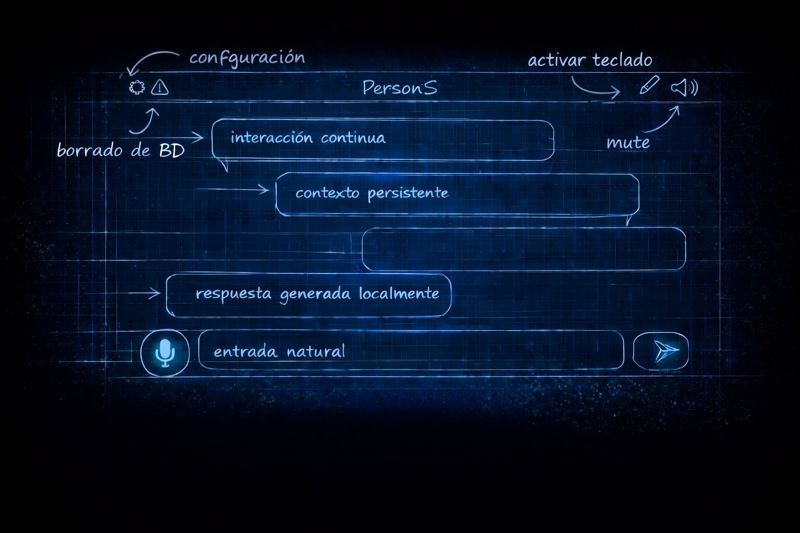
The main screen is organized into three areas: top (controls), center (conversation), and bottom (input).
In the top area, the gear icon opens Settings. Next to it is the data deletion icon, which allows you to erase the local conversation and memory database to start a clean session. On the right are the keyboard and audio input controls, including speech mute.
The central area displays the conversation as chat bubbles. In the lower area, the microphone activates voice interaction. When text mode is enabled, the input field and send icon appear to submit the message to the system.
Technical specifications
Apple devices with Apple Silicon (M1 or later, ≥ 8 GB memory)
Experience configuration
A visual guide to the main options and how the experience can be adjusted.
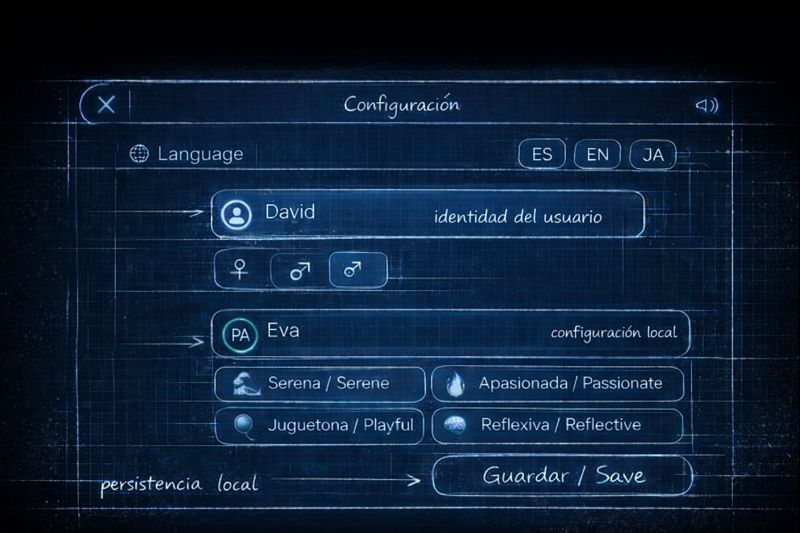
When opening Settings, you can choose the interaction language (ES / EN / JA) and define your local identity by entering your name and selecting your gender.
In the same panel, you configure the conversational entity: AI name and gender, and select the personality style from the available modes (Serene, Passionate, Playful, Reflective, and Caring). At the bottom you will find access to Legal & Licenses.
Disclaimer
PersonS is designed for personal, conversational use. It does not offer professional advice of any kind (medical, psychological, legal, or financial), nor is it intended to replace human relationships.